Applicantly

Judging rubrics that add themselves up

Build your score sheet as a form, send judges a link or give them accounts with assigned teams, and watch the ranked results fill in as scores arrive.

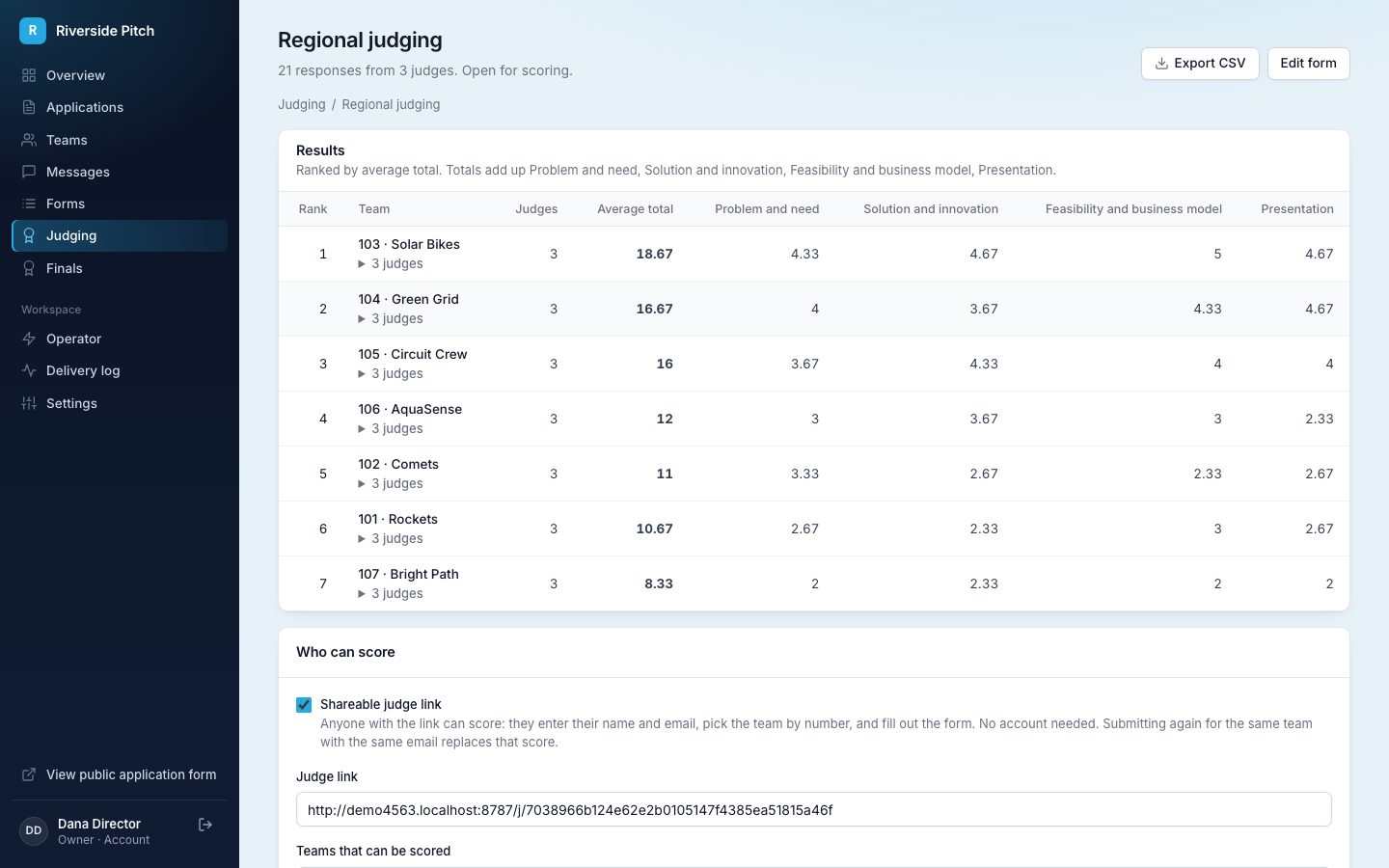
Judging results ranked by average total with per-criterion averages
Results ranked by average total

Your rubric, as a form

Start from a sample, a blank form, a copy of another form, or a Google Form link. Number fields and choices like "4 - Very good" count toward the total.

A link for any judge

Judges open the link, enter their name and email, pick the team by number, and score. No account, and no limit on how many judges use it.

Accounts for deeper review

Give judges an account and assign them teams. They read each application and its files, without contact details, then score.

Ranked automatically

Each score sheet is totaled, averaged across judges, and ranked, with an average for every criterion and a CSV export.

Teams found by number

Turn on team numbers and every team gets one automatically when it applies. Judges pick the team by number on the judging link, so a room of judges can score live pitches without a spreadsheet of names.

Results you can act on

The results page ranks every team by average total and shows each judge's sheet behind it. Answer rules can act on a score too, such as moving a team to Finalist when a judge recommends it.

  • Limit a judging form to teams in one stage
  • A judge who submits again for the same team replaces their earlier score
  • Remove a score that should not count
Ranked judging results with judge counts and criterion averages

Questions about judging and scoring

What is a judging rubric?

A judging rubric is a scoring guide that rates every entry on the same criteria, each on a fixed scale such as 1 to 5, so different judges score consistently.

What criteria should a judging rubric use?

There is no single standard. Pitch and science competitions often score the problem, the solution or innovation, feasibility, and presentation. Applicantly's sample judging form starts with those four on a 1 to 5 scale, and you can rename, add, or remove criteria.

How are scores calculated?

Each judge's scored answers are added into a total. A team's result is the average of its judges' totals, and teams are ranked by that average, with an average shown for each criterion.

Do judges need an account?

No. The shareable link works for any number of judges with no account. Judge accounts are for judges who should read applications before scoring, and plans include 5, 25, or unlimited judge accounts.

Is judging blind?

The shareable link is. With team numbers on, link judges pick and see each team only by its number. Judges with accounts do a full review: they see the application, team and member names, and files, but never emails, phone numbers, birthdates, or guardian details.

Can we use our existing Google Form score sheet?

Yes. Paste the Google Form link when you create a judging form. Questions convert directly, and any name or team-number questions are dropped because the judging link already asks for them.
Works well with

Set up your program this afternoon

Start with a template, make it yours, and share your application link. Free for 14 days.

Start your free trial