Applicantly

Select and onboard your cohort in one place

Review applications in stages, let finalists book interviews, and confirm your cohort with an onboarding form.

Sound familiar?

  • Interview scheduling by email
  • Onboarding details collected in a separate tool
  • No record of who was told what

Start from the Simple intake template, then change anything: stage names, questions, who receives each form, and what happens next.

Example setup

Stages

AppliedShortlistedInterview bookedOfferedJoinedDeclined

Forms

  • ApplicationBackground, statement, and references
  • Interview sign-upSlots across a week
  • OnboardingStart date, dietary needs, and agreement signature

Automation

  • Shortlisted sends the interview sign-up
  • Booking moves to Interview booked
  • Offered sends onboarding

AI Operator

Ask instead of clicking

Operator, the built-in AI assistant, answers questions about your program and makes changes after you allow them. For fellowships, directors ask things like:

  • "Move everyone with a booked interview to Offered once I approve the list."
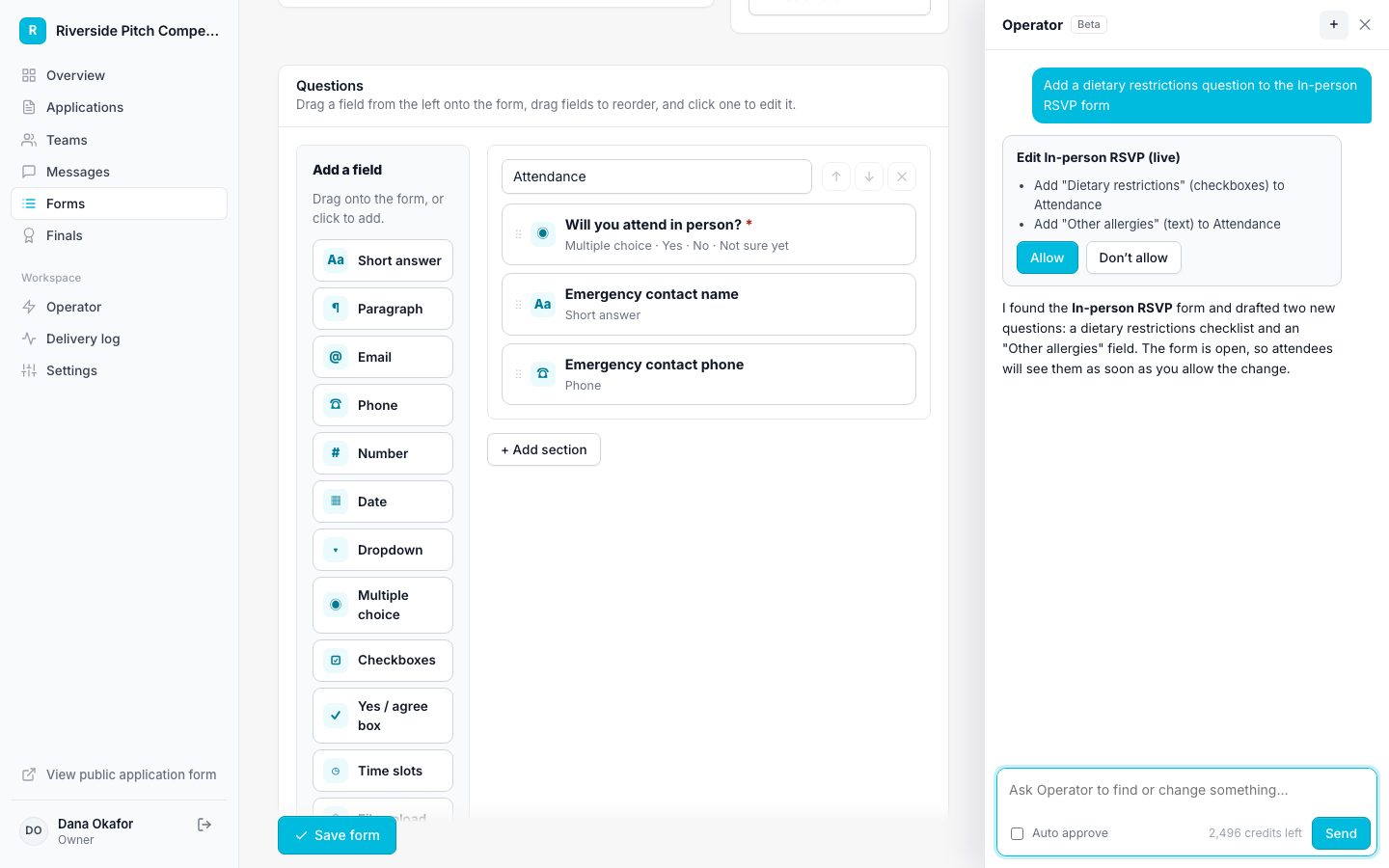
How Operator works
Operator proposing a change for approval

Features fellowships rely on

Questions

Can we run several cohorts a year?

Yes. Each cycle keeps its own applications, and staff can switch between them.

Run your fellowship on Applicantly

Start with a template, make it yours, and share your application link. Free for 14 days.

Start your free trial