Applicantly

From application to cohort, with less admin

Founders apply with their team and deck, your partners review in stages, and selected startups book pitch interviews and complete onboarding.

Sound familiar?

  • Decks scattered across shared drives
  • Founders asking for status updates by email
  • Pitch days scheduled by hand

Start from the Team competition template, then change anything: stage names, questions, who receives each form, and what happens next.

Example setup

Stages

AppliedScreeningPitch interviewAcceptedNot selected

Forms

  • ApplicationFounders, company details, traction, deck upload
  • Pitch interview sign-up20-minute slots with partner names
  • OnboardingCompany details and program agreement

Automation

  • Pitch interview sends the sign-up sheet
  • Accepted sends onboarding

AI Operator

Ask instead of clicking

Operator, the built-in AI assistant, answers questions about your program and makes changes after you allow them. For accelerators and incubators, directors ask things like:

  • "Summarize how many applications we have in each stage."
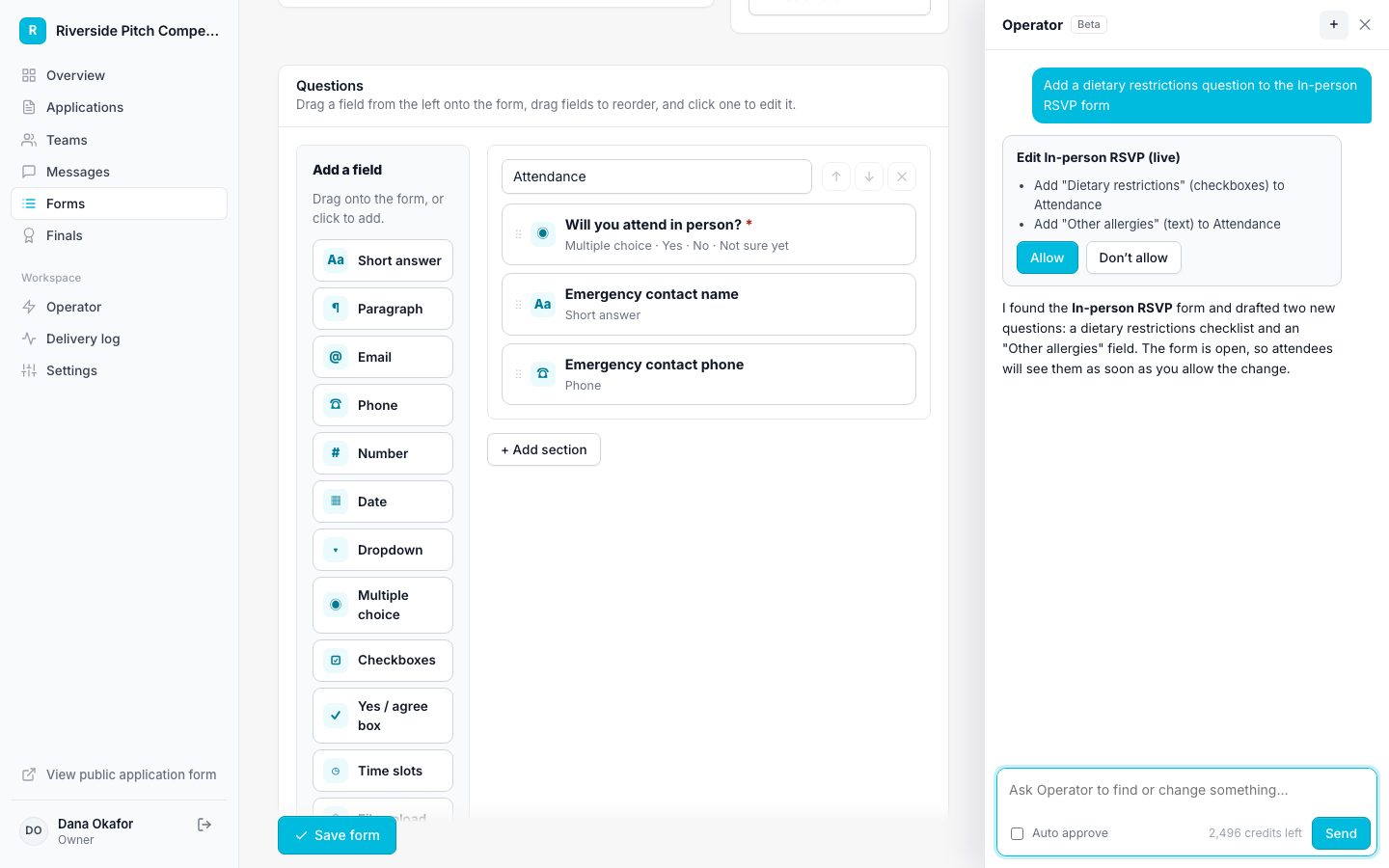
How Operator works
Operator proposing a change for approval

Features accelerators and incubators rely on

Questions

Can founders see their status?

Yes. Each team sees its current stage and next step in its portal.

Run your accelerators and incubator on Applicantly

Start with a template, make it yours, and share your application link. Free for 14 days.

Start your free trial